Time tracking software records how long you spend on tasks, clients, or projects, then sorts that time into billable and non-billable hours so you can turn it into an accurate invoice. If you charge by the hour, the tool matters less than what happens to the number it produces.
Search for time tracking software and you will find dozens of tools built for very different jobs: employee monitoring for large teams, productivity analytics for remote workers, and simple stopwatches for solo freelancers who just need to know what to bill. Picking the wrong category means paying for features you will never open.
What Time Tracking Software Actually Does
Timers versus manual entry
Most tools offer two ways to log time: a start and stop timer running in the background, or a manual entry you fill in after the fact. A live timer is more accurate if you tend to forget to log time until the end of the day. Manual entry works fine when your hours are predictable and you would rather not run another app all day.
Sorting billable from non-billable hours
For billing purposes, the core job of a tracker is tagging each block of time to a client or project and marking it billable or not. Internal admin, unpaid discovery calls, and actual client work should never sit in the same bucket when it is time to invoice.
Features That Matter for Billing, Not Just Tracking
Per-client and per-project hourly rates
If you charge different clients different rates, or bill some projects flat and others hourly, look for software that sets a rate per client or per project rather than one flat rate across the whole account. This is a common dividing line between free and paid tiers rather than a given. On Toggl Track, for example, billable rates are not part of the free plan at all and first appear on the Starter plan at $9 per user per month. Source: toggl.com/track/pricing, checked live 1 September 2026.
If you have not settled on the rate itself yet, that is a separate decision from the software, and our guide to flat rate versus hourly pricing works through which one fits the kind of work you do.
Idle detection and rounding rules
Idle detection flags time the timer kept running while you stepped away, so it does not quietly inflate an invoice. Rounding rules matter too, whether to the nearest 5, 6, or 15 minutes. A tool that rounds up aggressively can make an invoice look padded even when the work was not.
Reports you can actually hand to a client
A report that says 14.5 hours is not enough for most clients. Look for one that breaks hours down by day, task, or project description, because that is what backs up the invoice if a client ever questions the total.
Turn tracked hours into an invoice
Bring your totals over, add your rate, and send a branded invoice with automatic reminders when payment is late. Free for 30 days, no credit card required.
What Time Tracking Software Does Not Do
It usually does not send invoices
This is the part that catches people out. A dedicated time tracker's job normally ends at the report. Clockify is a clear example: invoicing is not included in its free plan and first appears on its Standard tier at $5.49 per seat per month billed annually, or $6.99 billed monthly. Source: clockify.me/pricing, checked live 1 September 2026. Most dedicated trackers are built the same way, which is to track first and invoice somewhere else.
It does not collect the payment
Even tools that offer a basic invoice export still need a separate way to actually get paid, whether that is a payment link, a bank transfer, or invoicing software that handles both the document and the collection.
How Tracked Hours Become a Real Invoice
The handoff most freelancers already do
At the end of a billing period, total your tracked hours by client, multiply by the agreed rate, and enter that as a line item. The rate-setting and invoice-formatting side of hourly work is covered in our companion guide on how to invoice hourly work, so this section sticks to the tracking-to-invoice step itself.
Building the invoice once hours are totaled
In Billbooks, an hourly invoice is just a line item: a description, a quantity that holds your hours, and a rate. Recurring clients can be set up once and reused each cycle, so the only thing changing week to week is the number you bring over from your tracker. Grouping that work by client and project is handled on the Billbooks side, and since September 2026 so is the timing: Billbooks has a built-in timer that logs each session against the client it belongs to.
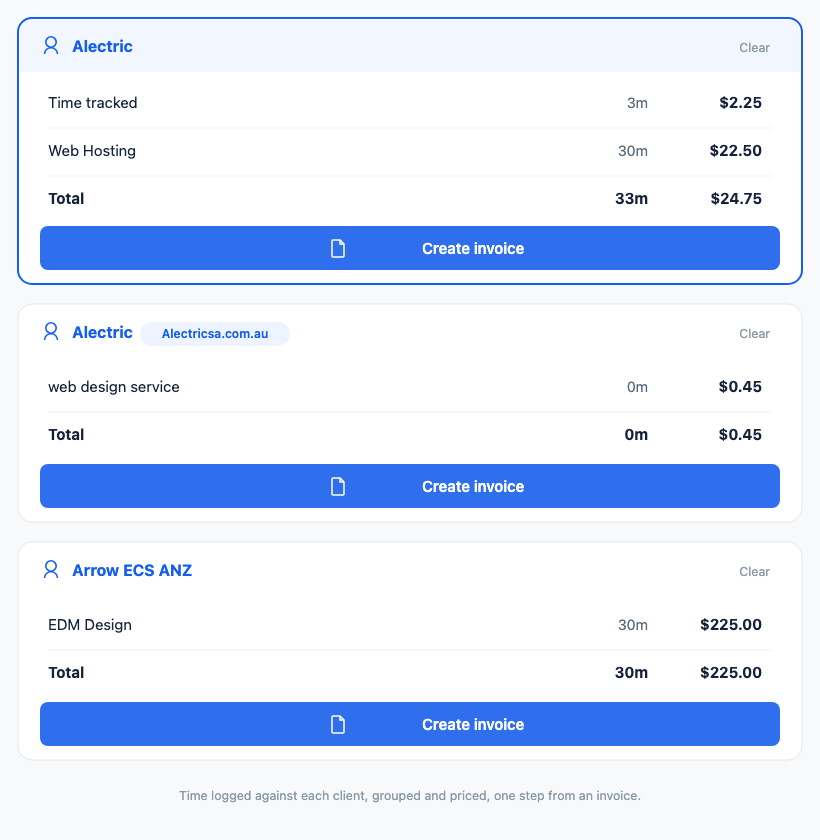
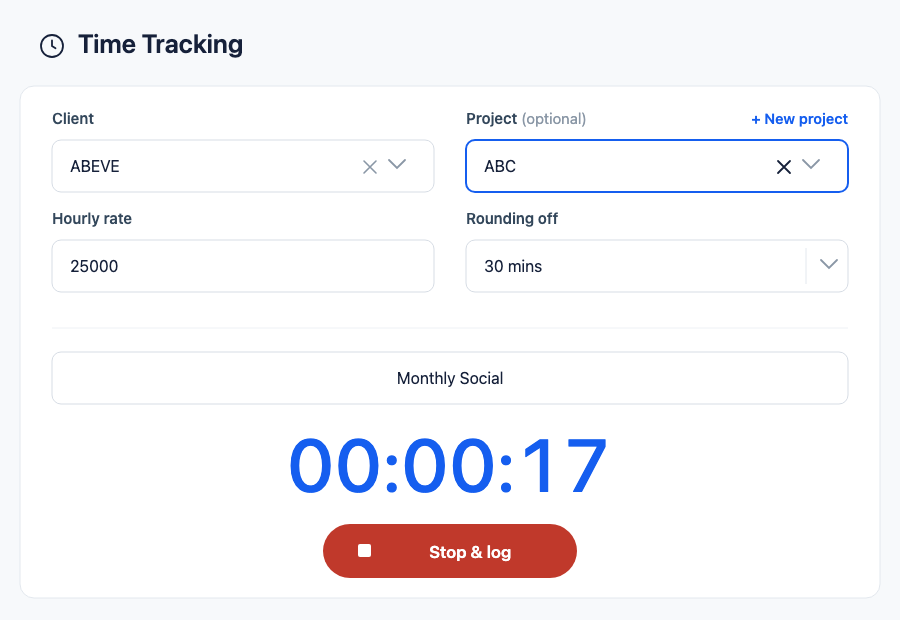
To be straightforward about what it does: Billbooks has a simple built-in timer. You start and stop it and pick a client, an optional project, a task name and an hourly rate. The rate is prefilled from that client's most recent invoice, and you can round time up to an interval. Each entry is logged under its client, and Create invoice turns the entries into invoice lines at hours times rate. Entries sync to your account, so a timer you start on one device shows up on another. It is not a full timesheet system: you can't type in hours by hand, it doesn't detect idle time, and there are no approval workflows. If you need those, keep a dedicated tracker and bring the totals across when you invoice. Source: the Billbooks app, checked 15 September 2026.
Which Tools Turn Tracked Hours Into an Invoice
This is the one criterion worth sorting tools by if you bill by the hour, because it is where they actually differ. Some issue the invoice themselves, some hand you a report to attach to an invoice you raise elsewhere, and several put the invoicing behind a paid tier while the tracking is free. From each company's own help and pricing pages, read in October 2026 and linked beside each entry. We list only what we checked, so a tool that is not here has not been checked, not ruled out.
- Harvest issues invoices on every tier, including the free one, which covers 1 seat and 2 projects. Paid plans start from $9 per seat a month billed annually, or $11 monthly. The thing to read twice is that both paid tiers say starting from: your base rate covers core features, and additional invoices, projects, clients and tasks are billed on usage at rates the pricing page does not list (Harvest pricing). See Billbooks vs Harvest.
- Toggl Track calculates the billable amount as the hours come in, with rates set per client, project, member or task, and keeps historical rates so last year's report still reflects last year's price. Billable rates are not on the free tier; Starter is listed at $9 per user a month. Its own pages describe two different endings to the workflow, a one-click PDF invoice on one page and exporting a CSV or PDF to attach to an invoice you raise elsewhere on another, so check which one your plan actually gives you. It also integrates with QuickBooks and Xero (Toggl pricing).
- Clockify puts invoicing on Standard and above, listed at $5.49 per user a month, and its help centre and pricing table both exclude it from Free and Basic. Worth knowing before you buy: its own Basic plan page lists invoicing among that plan's features, which contradicts both. When you do have it, you import uninvoiced billable time by client and date range and the entries are marked invoiced so they cannot be billed twice. It does not collect the payment (Clockify: create and manage invoices).
- Paymo is the one here that invoices on its free plan, turning timesheet entries, flat-rate tasks and expenses into an invoice. The catch is the shape of the free tier rather than the feature: 1 user, 1 client and 2 projects. Solo is the entry paid tier, and its pricing page and help centre quote different monthly figures for it, so take the number off the live page (Paymo pricing).
- Everhour builds the invoice from uninvoiced billable time and expenses, grouped by project, task, person or date, with client records holding tax rate, discount and payment terms as defaults, and invoiced time marked so it is not billed again. Drafts export to QuickBooks Online, Xero or FreshBooks. Which plan carries invoicing is not stated on the pages we read, so confirm that before choosing it for this (Everhour invoicing).
- FreshBooks tracks time and raises the invoice in the same product, which is the simplest version of this if you are happy inside an accounting tool. See Billbooks vs FreshBooks.
- Billbooks tracks time against projects and clients and turns unbilled entries into invoice lines, at one flat price for the business rather than per seat, with nothing billed on usage. What it does not do is the dedicated-tracker half: no manual timesheet entry, no idle detection, no approval workflows. The honest version of its place in this list is above.
Read down that list and the pattern is that tracking is cheap and invoicing is the upsell. If the invoice is the point of tracking the hours in the first place, price the plan that includes it rather than the one on the front of the pricing page.
Free Time Tracking Software Versus Paid
What free plans typically include
Free plans are more capable than people expect. Toggl Track's free tier covers time tracking on web, desktop, and mobile plus integration with more than 100 tools through its browser extension, though it is limited to a small team and excludes billable rates. Clockify's free plan supports up to 5 users with unlimited time tracking. Sources: toggl.com/track/pricing and clockify.me/pricing, both checked live 1 September 2026.
When paying actually earns you something
Paying starts to make sense when you bill several clients at different rates, need timesheet approvals, or want profitability reporting across a portfolio of work. On Toggl Track those sit on the Premium plan, which is $14 per user per month for the first year on annual billing and renews at $18. Source: toggl.com/track/pricing, checked live 1 September 2026. For a solo freelancer tracking one or two clients, a free plan is often genuinely enough.
Choosing the Right Tool for Your Business
Match the tool to how you actually work rather than to the longest feature list. A solo freelancer billing two or three clients rarely needs workforce analytics or approval chains. A small agency billing a dozen clients across several people probably does. Either way the tracker's job is to hand you an accurate, defensible number, and the invoice is a separate step.
Two free tools for the two numbers this comes down to, no signup
Bill for those hours properly
Billbooks turns your totals into a client-ready invoice with your rates, your branding, and reminders that chase late payment for you. Plans from $7.95 a month.
Worth a few minutes once the hours are tracked:
FAQ
Does time tracking software send invoices too?
Rarely as its core function. Most dedicated trackers stop at the time report. Clockify, for instance, does not include invoicing on its free plan at all, and it first appears on the Standard tier at $5.49 per seat per month billed annually. Source: clockify.me/pricing, checked live 1 September 2026.
What should a freelancer look for first in time tracking software?
Accurate billable versus non-billable tagging, per-client or per-project rates if you charge different amounts, and a report detailed enough to support an invoice if a client asks questions. Everything else is secondary.
Is free time tracking software good enough for freelancers?
Often yes, for someone tracking hours for one or two clients. Toggl Track's free plan includes web, desktop, and mobile tracking with over 100 integrations, and Clockify's free plan supports up to 5 users with unlimited tracking. The usual catch is billable rates, which Toggl Track puts on its paid Starter plan. Sources: toggl.com/track/pricing and clockify.me/pricing, both checked live 1 September 2026.
How do I turn tracked hours into an invoice?
Total your billable hours for the period, multiply by the agreed rate for that client, and enter it as a line item with the hours as the quantity and your rate as the unit price. Billbooks supports hourly line items and repeat billing for recurring clients.
Does Billbooks track time?
Yes, since September 2026. Billbooks has a start and stop timer that logs time against a client, an optional project and an hourly rate, and turns the logged entries into invoice lines in one click. It does not have manual timesheet entry, idle detection or approvals, so teams that need those should pair it with a dedicated tracker. Source: the Billbooks app, checked 15 September 2026.
Related Reading
For the pricing decision behind the hours, see Flat Rate vs Hourly. For turning those hours into a document a client will pay, see How to Invoice Hourly Work. If you want to see what the invoicing side covers before committing, the Billbooks invoicing overview and pricing lay it out.