bill the hours you actually worked :-)

Track the time, then turn it into the invoice

Start a timer against a client, a project and the task you are on. Billbooks applies your hourly rate as it runs, rounds the total to the billing interval you use, and turns the entries into a new invoice or adds them to a draft you already have open.

Time Tracking Running
01:47:12
Rewire the back office, Nordholm Design
ClientNordholm Design
ProjectOffice fit-out
Hourly rate$85.00
Rounding off30 min
Total $170.00
Create a new invoice Add to a draft
now, even quicker :-)

Billbooks runs on a global edge network

Your invoices, estimates and clients are served from the network location closest to you, not from one machine on the other side of the world. Moving between a list, a new invoice and a sent document happens in the time it takes to look at it.

Cloudflare network No page reloads

The hours are the product. Most of them get remembered, not recorded

If you bill by the hour or on time and materials, the invoice is only as good as your memory of the week. A note on a phone, a line in a notebook, a guess on Friday afternoon. The guess is almost never in your favour, because the small jobs are the ones that fall out of it: the twenty minutes on the phone, the second trip for a part, the revision that was going to be quick.

Three steps, and the last one is the invoice

Nothing to reconcile afterwards, because the rate and the client are on the entry from the start.

Start the timer

Pick the client and project, type what you are working on, and start. The timer keeps running on the server, so closing the tab does not lose it.

It rounds the way you bill

Set a rounding interval and Billbooks applies it. At 30 minutes, 23 minutes of work bills as 30. Leave it off and it bills to the minute.

Send it as an invoice

Turn the entries into a new invoice, or add them to an invoice already sitting in your drafts. The hours arrive as line items with the rate applied.

the billing convention :-)

Rounding, because that is how the trade actually bills

Plenty of work is billed in blocks rather than to the exact minute: a quarter of an hour, a half hour, a full hour minimum. Doing that in your head at the end of the week is where the money quietly goes missing.

Set the interval once and every entry follows it. Set it to zero and nothing is rounded at all, which is what you want if you bill to the minute or you are tracking time for your own records rather than for a client.

Worked23 min
Rounding30 min
Billed30 min

The same convention every time, applied by the software rather than remembered on a Friday.

Who bills by the hour, or on time and materials

If your invoice is hours multiplied by a rate, plus whatever you fitted, this is for you.

Trades and site work

Time and materials is the default here: hours on site plus the parts you fitted.

  • ElectricalStart the timer on arrival, then add the cable and fittings to the same invoice.
  • PlumbingLog call-out time per job and bill the parts on the same invoice.
  • HVACTime each service visit so maintenance and repair work bill as separate lines.
  • CarpentryTrack hours per room or stage, so a long fit-out can be billed as it goes.
  • HandymanSeveral small jobs in one day, each timed against the right customer.
  • RoofingCrew hours per roof, with materials added before the invoice goes out.
  • FlooringTime prep, laying and finishing on one project for a clear time and materials bill.
  • Tile InstallationHours per area tiled, rounded the same way on every job.
  • WeldingShop and on-site hours tracked separately, then billed with the rod and gas.
  • PaintingLog prep and coats by the hour when a job runs past the quote.
  • House PaintingTime each room or elevation so extra work is easy to show and bill.
  • ExcavationMachine and operator hours per site, entered straight onto the invoice.
  • DemolitionCrew hours per day on site, with disposal added as its own line.
  • SolarInstall and commissioning hours per system, kept apart from the panel costs.
  • LocksmithTime the call-out from arrival, with a minimum set by your rounding interval.
  • Auto RepairLabour time per vehicle, billed alongside the parts you fitted.
  • Car RepairTrack diagnosis and repair time separately so the customer sees both.
  • TowingLog waiting and recovery time on top of the tow itself.
  • MaintenanceTime each visit on a maintenance contract and bill the month on one invoice.
  • Home repairLog every small fix at a property and bill them together at the end.

Professional services

Billed in hours against a matter, an engagement or a retainer.

  • AccountantTrack hours per client engagement and bill the month from one list.
  • BookkeepingTime each client’s monthly close to check a fixed fee against the real hours.
  • AuditorHours per engagement and per task, ready for a detailed fee note.
  • AttorneyTime against each matter and turn the entries into an invoice.
  • NotaryLog appointment and travel time, and bill both on one invoice.
  • Tax ConsultantTrack advisory hours per client, separate from fixed-fee filing work.
  • Tax PreparerSee which returns ran long in the busy season, and bill the extra hours.
  • Payroll SpecialistTime each payroll run per client and spot the ones that cost you most.
  • ConsultingLog hours per client to check the retainer still covers the work.
  • HR ConsultantTrack hours per project, from a policy rewrite to a hiring round.
  • Marketing ConsultantTime strategy, meetings and reporting against each client’s retainer.
  • Financial ConsultantHours per client plan, billed with a clear breakdown by task.
  • Virtual CFOLog monthly hours per company to check the retainer still matches the work.
  • ArchitectTrack hours per project stage, from concept drawings to site visits.
  • IT SupportTime each ticket or site visit and bill the month per client.
  • Computer RepairBench time per device, billed with the parts you replaced.

Creative and studio work

Hourly for the open-ended parts, and revisions that are never quite quick.

  • Graphic DesigningTime each round of revisions so the extra ones can be billed.
  • Web DesignHours per page or feature, billed as each stage finishes.
  • CopywriterTrack research and writing time to check your per-word rate still pays.
  • Freelance WriterLog time per piece to see which clients pay well per hour.
  • IllustrationTime sketches and finals separately to price the next brief better.
  • AnimationHours per scene logged against the project, so overruns are visible early.
  • Video EditingTrack edit hours per project, including the late changes.
  • Video ProductionLog shoot days and post-production hours on one project.
  • VideographyTime the shoot, the travel and the edit, and bill each as its own line.
  • PhotographyLog shoot and editing hours per client, beyond the package price.
  • SEOTrack monthly hours per client against the retainer you agreed.
  • Social MediaTime content creation and community work per account each month.
  • TranslationLog the revision and terminology hours a per-word rate leaves out.
  • Voice-overTrack studio and retake time, billed by the hour or the session.
  • Content CreatorHours per brand deal, so a flat fee can be checked against the work.

Teaching, coaching and care

Sessions and visits, priced by the hour and repeated weekly.

  • Academic TutoringLog each session per student and bill families once a month.
  • Language TutoringTime lessons per student, rounded to your usual lesson length.
  • Piano LessonRecord each lesson against the student and invoice the term in one go.
  • MusicianTrack rehearsal and session hours for each gig or recording.
  • Personal TrainingLog sessions per client and bill the month from the list.
  • Fitness InstructorTrack classes taught at each studio and invoice every venue separately.
  • Yoga InstructionTime private sessions and studio classes, and bill them separately.
  • Life CoachingLog each session against a client to keep track of their package.
  • Career CoachTrack sessions and application review time per client.
  • Nutrition CoachLog consultations and plan writing time per client.
  • Sports CoachingTime training sessions per athlete or team and bill monthly.
  • Massage TherapyRecord each appointment’s length and bill the time actually worked.
  • PsychologistLog session time per client for accurate monthly invoicing.
  • NurseTrack visit hours per patient or per agency shift.
  • BabysittingLog hours per family, including the late finishes.
  • Dog WalkingTime each walk or visit and bill owners weekly.

Property, cleaning and grounds

Crew hours on a property, sometimes with a minimum call-out.

  • CleaningCrew hours per property, with supplies added as their own line.
  • Window CleaningTime each round per property and bill regular customers monthly.
  • Pressure WashingLog hours per job, with your minimum call-out set by rounding.
  • LandscapingCrew hours per site, billed with the plants and materials used.
  • Lawn CareTime each visit and bill the season per property.
  • GardeningLog hours per garden and bill regular clients monthly.
  • Snow RemovalTrack each call-out and clearing time per property through the season.
  • Junk RemovalLog loading time per job on top of the disposal charge.
  • Pest ControlTime treatments per property and bill the follow-up visits.
  • Property ManagerLog the hours spent on each property for billing its owner.
  • Moving CompanyCrew hours per move, from loading to the last box off the truck.
  • Equipment RentalTrack operator hours on top of the hire charge.

Yours not listed? The invoice, quote, receipt and estimate templates cover more than 100 trades and professions. Browse them all.

Time Tracking is included at the one flat price, with no per-seat add-on.

Try it Free

Questions, answered

Does Billbooks have time tracking? +

Yes. Billbooks has a built-in timer you start against a client, a project and a task. It applies your hourly rate while it runs, rounds the total to the billing interval you choose, and turns the entries into a new invoice or adds them to an existing draft.

How do I turn tracked hours into an invoice? +

From Time Tracking, choose the entries you want to bill and either create a new invoice or add them to an invoice already in your drafts. The hours arrive as line items with the rate already applied, so there is nothing to retype.

Does the timer keep running if I close the tab? +

Yes. The running timer is stored against your account rather than in the browser, so closing the tab or moving to another device does not lose the time you are part way through.

Can I add time I forgot to track? +

Yes. You can enter time manually against the same client, project and task, so a job you finished before you started the timer still gets billed.

What does the rounding setting do? +

It rounds each entry up to the interval you choose. At 30 minutes, 23 minutes of work bills as 30. Set it to zero and nothing is rounded, which suits anyone billing to the minute.

Can I track time against a project as well as a client? +

Yes. Each entry carries a client and a project, so the same client can have several projects running and each is billed on its own line.

Is time tracking included in the plan? +

Yes. It is part of Billbooks at the one flat price. There is no separate time tracking tier and no per-seat charge for it.

Can I bill materials on the same invoice as the hours? +

Yes. The hours arrive as line items on a normal Billbooks invoice, so you add parts, materials or a call-out fee to the same invoice as ordinary lines.

You'll love sending invoices from our app

An app so good you will want to get tasks done instead of putting them off. Stay on track and keep your cashflow going.
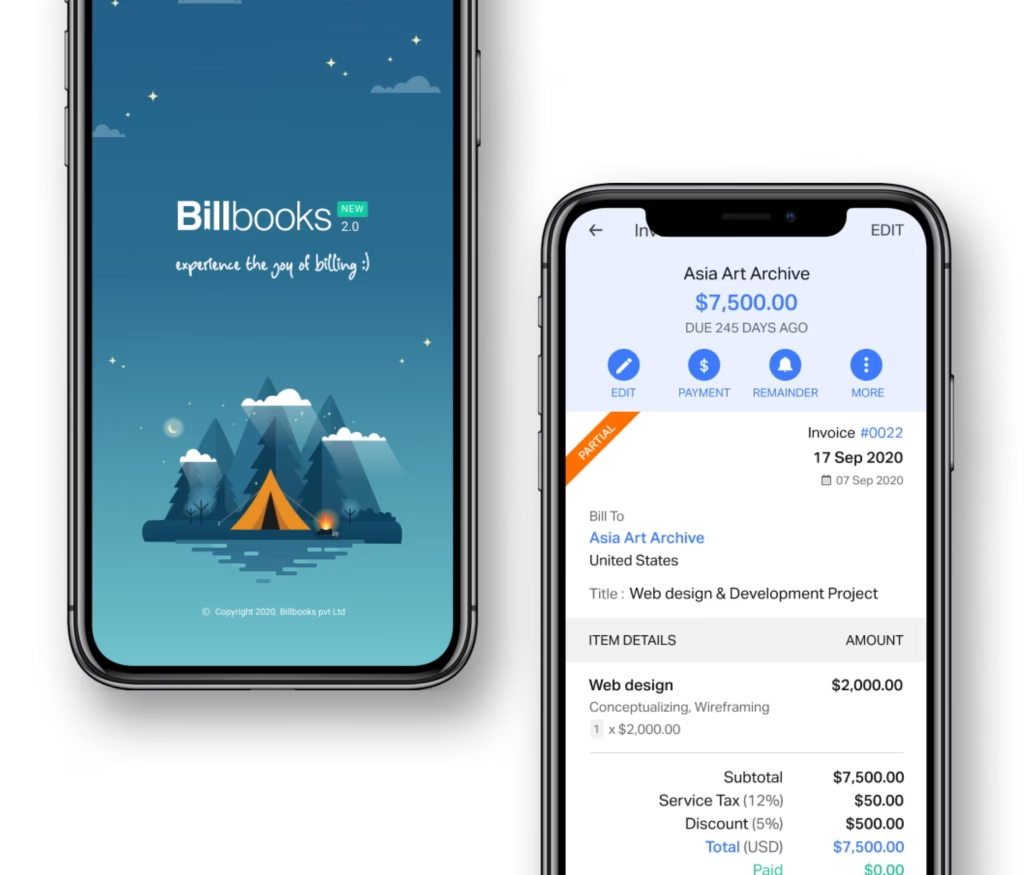
Billbooks mobile app

See how Billbooks compares

FreshBooksQuickBooksXeroWaveZoho InvoiceSquare InvoicesAll comparisons

Suggest a feature for Billbooks

    Use Billbooks your way

    Submit an enquiry