
Invoices written in the evening, days after the job, then chased for weeks. A professional invoice should take a minute, the same day the work ends: clients and items fill themselves in, so payment starts when the work stops.
| Item | Qty | Rate | Amount |
|---|---|---|---|
| Brand identity, phase 2 | 1 | 2,400.00 | 2,400.00 |
| Style guide document | 1 | 450.00 | 450.00 |
Your invoices, estimates and clients are served from the network location closest to you, not from one machine on the other side of the world. Moving between a list, a new invoice and a sent document happens in the time it takes to look at it.
Invoices
New invoice
Invoice #1042
Awaiting paymentSent to the client
DeliveredEstimates
Pick a client
Choose from your client list, or add a new one on the spot.
Add line items, tax, and terms
Pull items from your catalog or type them fresh. Set payment terms and, if you want, a payment reminder for this invoice.
Send it
The client gets a clean, branded invoice by email, with a secure link, no login required to view or pay.
Track it to paid
Know when it's been opened, when it's overdue, and when it's settled, all from one list.
Start typing and Billbooks autocompletes from your client list, city and all. New client? Add them inline without leaving the invoice. Line items work the same way, so a full invoice comes together in seconds.
Every invoice carries your logo, your columns, and your totals, laid out the same clean way each time, so your billing always looks like you.
| Item | Qty | Rate | Amount |
|---|---|---|---|
| Brand identity, phase 2 | 1 | 2,400.00 | 2,400.00 |
| Style guide document | 1 | 450.00 | 450.00 |
Billbooks pre-fills the From, To, and Subject. Tweak the message, add a Bcc, attach the PDF, and nothing leaves until you click Send.
Email is still the default, and it is not the only way out. Send an invoice, quote or proforma straight from Billbooks in one tap. It shares the same secure link the client would get by email, so they can view it and pay from the message, and you still see when it was opened.
Custom invoice columns
Rename the Items, Units, Rate, and Amount headers from Preferences so the invoice reads the way you actually bill.
Invoice templates
Pick the layout your invoice is built from in Preferences. More template designs are on the way.
Terms and conditions
Save your standard terms once and they auto-fill onto every new invoice, then edit them per invoice when a job needs different terms.
Set taxes
Apply GST, VAT, or a custom tax rate, and Billbooks does the math on every line and the total for you.
Set QR
Add a payment QR code to the invoice so clients can scan and pay from their phone in seconds.
Set Digital Signature
Add your signature from Preferences so every invoice goes out looking signed off, not just sent.
Attach a signed contract, a reference photo, or a purchase order straight onto the invoice. It travels with the invoice, so the client has everything in one place, no separate email thread.
The link opens a clean, branded page with the amount due, the line items, and a Pay Now button when a payment gateway is connected. No account, no password, just the invoice and a way to settle it.
Recurring invoices
Retainers and subscriptions bill on repeat. Set it up once, and Billbooks sends every cycle on schedule.
Set an end date, or a number of invoices to send, and it stops on its own.
See Recurring Invoices →Automatic payment reminders
Turn them on when you send, and Billbooks chases unpaid invoices for you, getting firmer the longer they stay open.
Quick actions
Send, forward, print, or duplicate straight from the list.
Open alerts
Know the moment a client opens the invoice.
Digital signature
Add a signature so it looks signed off, not just sent.
Auto payment reminders
Billbooks chases the late payment for you, automatically.
Attach files & receipts
Drop a contract, photo, or receipt onto the invoice.
Every core feature above is included at one flat price, no add-on tiers.
Try it FreeThe link opens a clean, mobile invoice with a Pay Now button, no app, no account. The moment they open or pay it, you get a notification.
Invoice #26-27/0413 was opened by Elin Berg, Nordholm Design Studio, today at 2:12 pm.
Access using a secure link, without a login
Clients view their invoices using a secured link, no account to create and no password to remember, so nothing stands between them and paying you.
Billbooks sends over encrypted SMTP (TLS) with dedicated sending IPs, so your invoices land in the inbox, not the spam folder, on every major platform.
Gmail
Outlook
Mac Mail
Windows
Android
Rated 4.7/5 on Capterra and 4.2/5 on G2, based on early reviews.
★★★★★
"I used to hate sending invoices and chasing payment. Now I set the reminder once and forget about it."
Freelance designer
★★★★★
"The client portal link means I stop getting 'how do I pay this' emails. They just tap Pay Now."
Marketing agency owner
★★★★★
"Renumbering invoices by hand in a spreadsheet was the worst part of my week. Billbooks just handles it."
Independent consultant
Can't find a feature?
Tell us what would make Billbooks work better for you.
Photograph an old invoice or drop in a PDF. Billbooks reads the client, the dates, the line items, the tax and the currency, and gives you back a real invoice you can edit rather than a file you have to store.
Yes, invoice numbers are assigned automatically and stay sequential, no more renumbering a template by hand.
Yes, if you've connected a payment gateway (PayPal, Stripe, Authorize.Net, or Braintree), the client can pay straight from the invoice they receive.
Yes, open alerts are built in, so you know when it's been seen, not just sent.
Yes, from Preferences you can rename the Items, Units, Rate, and Amount headers to match how you bill.
Yes, add supporting files like a contract or a reference photo directly on the invoice before you send it. They stay attached for the client to see.
No, the invoice link opens to a branded page with no login required, plus a Pay Now button if you have a payment gateway connected.
Yes, set up a recurring invoice once and Billbooks generates and sends it on your schedule. See Recurring Invoices for the details.
View, Edit, Send Invoice, Forward Invoice, Print, Download PDF, or Duplicate, all one click away from any row in your invoice list.
Yes, unlimited invoices, included at the one flat price.
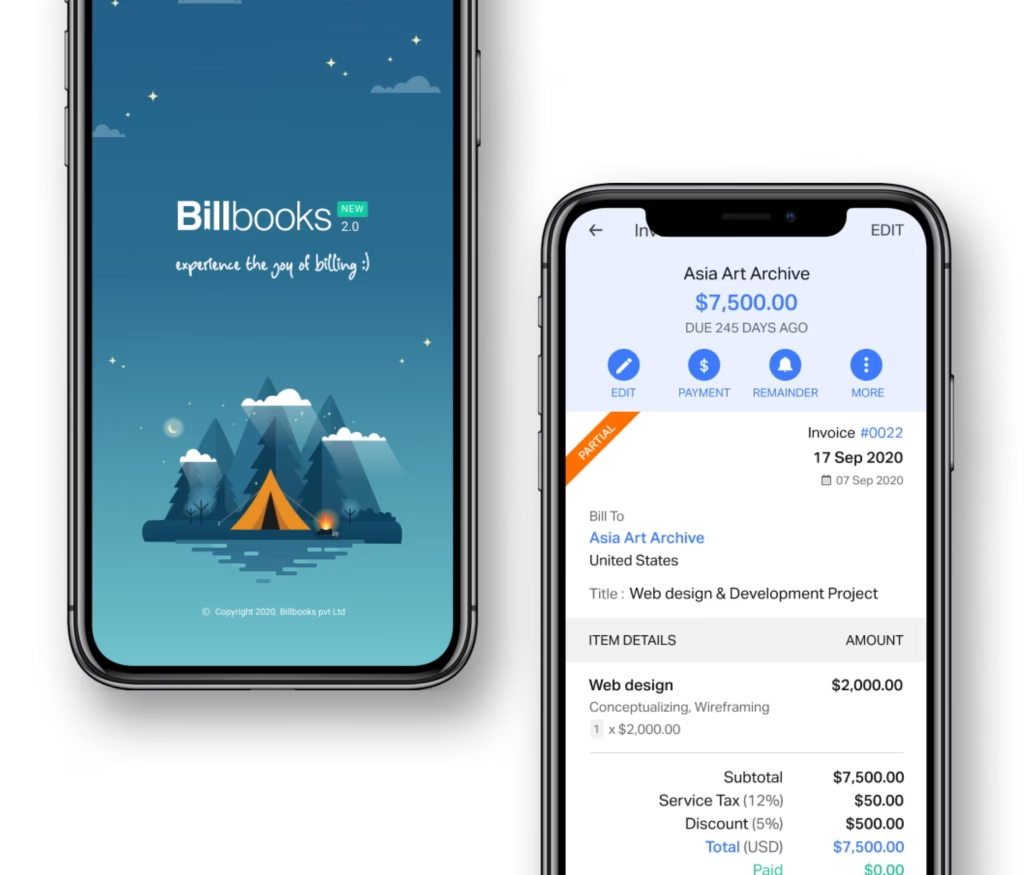
An app so good you will want to get tasks done instead of putting them off. Stay on track and keep your cashflow going.
A little kit of calculators and generators, on the house.
Creating and sending an invoice in Billbooks, start to finish, in under a minute.
Pairs with Quotes and Estimates for the document that comes before it, Expenses & Items for billing a job's real cost back to the client, and Recurring Invoices for retainer and membership billing. Browse layouts in Invoice Templates, or try the free invoice generator first.
See how Billbooks compares